
Outage schedules,
stress-tested.
Nuclearn Work AI checks your P6 outage schedule two ways. It finds the logic ties that set your finish date, for your planners to review. And it runs the schedule thousands of times with durations learned from your past outages, to show the odds of making your goal date. For finance, it tags work orders capital or expense.
- Reads P6 schedule exports
- Single-tenant, hosted by Nuclearn
- Signs in through Nuclearn
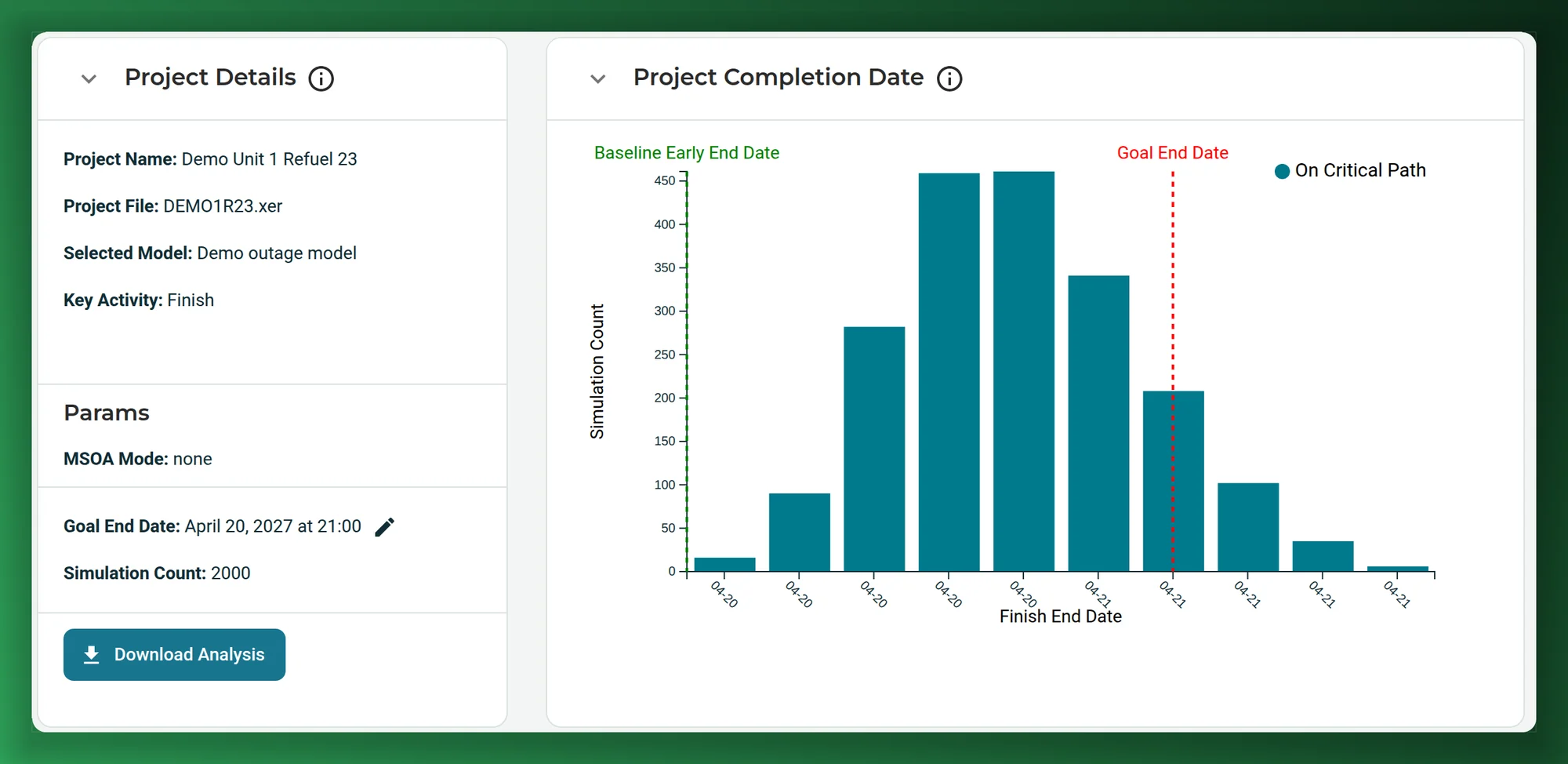
Screenshots on this page show a synthetic refuelling outage schedule, as it appears in Nuclearn Work AI today.
- Backed by NuclearnAI software built for nuclear plants since 2021
- Over 70 facilitiesNuclearn products serve sites in North America and the U.K.
- ISO/IEC 27001:2022Certified information security management
From the outage schedule to the work worth replanning.
Your schedulers build the outage in P6 and keep it there. Work AI reads the same schedule, finds the logic that sets its finish, puts odds on that finish, and shows which activities to look at first, using your own outage history.
Find the logic that sets your finish date
Work AI works out the earliest finish your schedule's logic allows and ranks the ties that hold it back, for your outage team to keep, change or release.
See outage optimization → Outage managersPut odds on your goal date
Work AI runs the outage thousands of times and shows the spread of finish dates against your goal, for the whole schedule or a milestone you pick. Run it again on a fresh export mid-outage.
See schedule risk → Outage schedulersFind the work that really drives the finish
For each activity: how often it lands on the critical path, and how many hours it pushes the end date. Activities with float that often end up critical stand out before the outage starts.
See the drivers → Schedulers and outage controlsPlan with durations from your own history
Pair each past outage's baseline with what actually happened. Work AI learns how long work like each activity really took at your plant, instead of trusting the planned duration.
See your history → Leadership and project controlsSee each project's risk on one page
Outages and projects ranked by due-date risk and laid out by goal date, with the next milestone for each.
See the details → Finance and work controlFind capital work booked as O&M
Capitalizer tags work orders capital or expense with a model trained on your own work-order history.
See Capitalizer →Ten thousand activities, about a month, one finish date.
An outage schedule takes more than a year to build. P6's critical path uses one duration per activity, so work that ran long last outage is often planned at the same duration again, and a string of work with float looks safe until it slips.
Once the outage starts, emergent work and slipped activities have to be fitted in, often with a few hours to reschedule each day. INL found this is one reason outage durations almost always exceed the original plan.1
Work AI shows which logic sets the finish and where the schedule is likely to slip, before the outage starts.
INL: refuelling outages typically complete over 10,000 scheduled activities, from several thousand work orders, in around 30 days.
INL's estimate of what lost generation can cost while the unit is down, which is why each day an outage runs long matters.
INL's figures describe refuelling outages in general, not results from Nuclearn Work AI. Sources at the foot of the page.
From a P6 export to the activities worth replanning
No new scheduling tool. Work AI reads the schedules you already export from P6.
Load your schedules
Upload .xer exports: the schedule you're working on, and the baseline and as-executed schedules of past outages.
Work AI checks it
It recomputes your dates from the file, finds the ties that set the finish, and runs the schedule up to 10,000 times with durations learned from your past outages.
Your planners decide
They review the ranked ties and the activities that push the finish, make their changes in P6, and run it again.
Find the logic that sets your finish date.
Most of an outage's length is set by its logic: which work has to wait for which. Work AI recomputes your schedule's dates from the P6 export itself and checks them against P6's own, so it works on the schedule you actually have. It then finds the earliest finish your logic allows, inside the protections your plant sets, and ranks the relationships holding the finish back.
- A ranked review queue, not an automatic re-plan: your outage team decides on each tie.
- Measured against the milestone that matters to you, such as grid sync or the project finish.
- Can run alongside an outage in shadow mode, without changing the plan.
Offered today as a pilot on your own outage schedules, run with your outage team and hosted by Nuclearn. Approved changes go into P6 through your own change process.
The odds of finishing on time, not a single date.
Each run draws a duration for each unfinished activity from what your history says is likely, then works the schedule through your P6 logic. Together the runs give a spread of finish dates and the share that miss your goal end date.
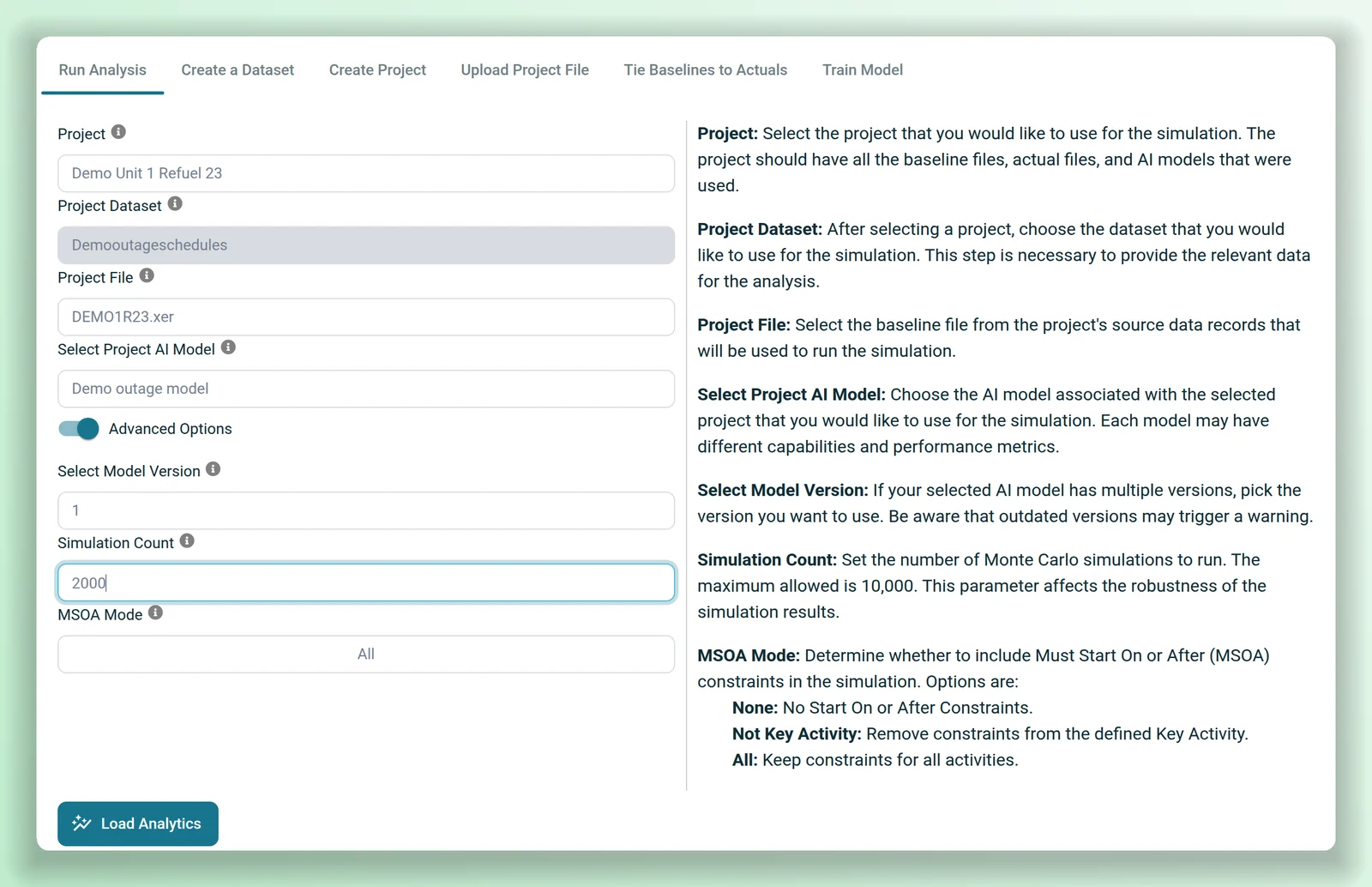
- Measure against the project finish, or against a key activity such as a milestone.
- Set a goal end date for each project; due-date risk is the share of runs that land after it.
- Keep P6's start-on-or-after constraints, or switch them off to see what the logic alone allows.
- Run it again on a fresh export mid-outage: finished activities drop out.
A simulated finish date is a forecast from your own history, not a commitment. Your schedule stays in P6, and Work AI doesn't change it.
Find the activities that really move the finish.
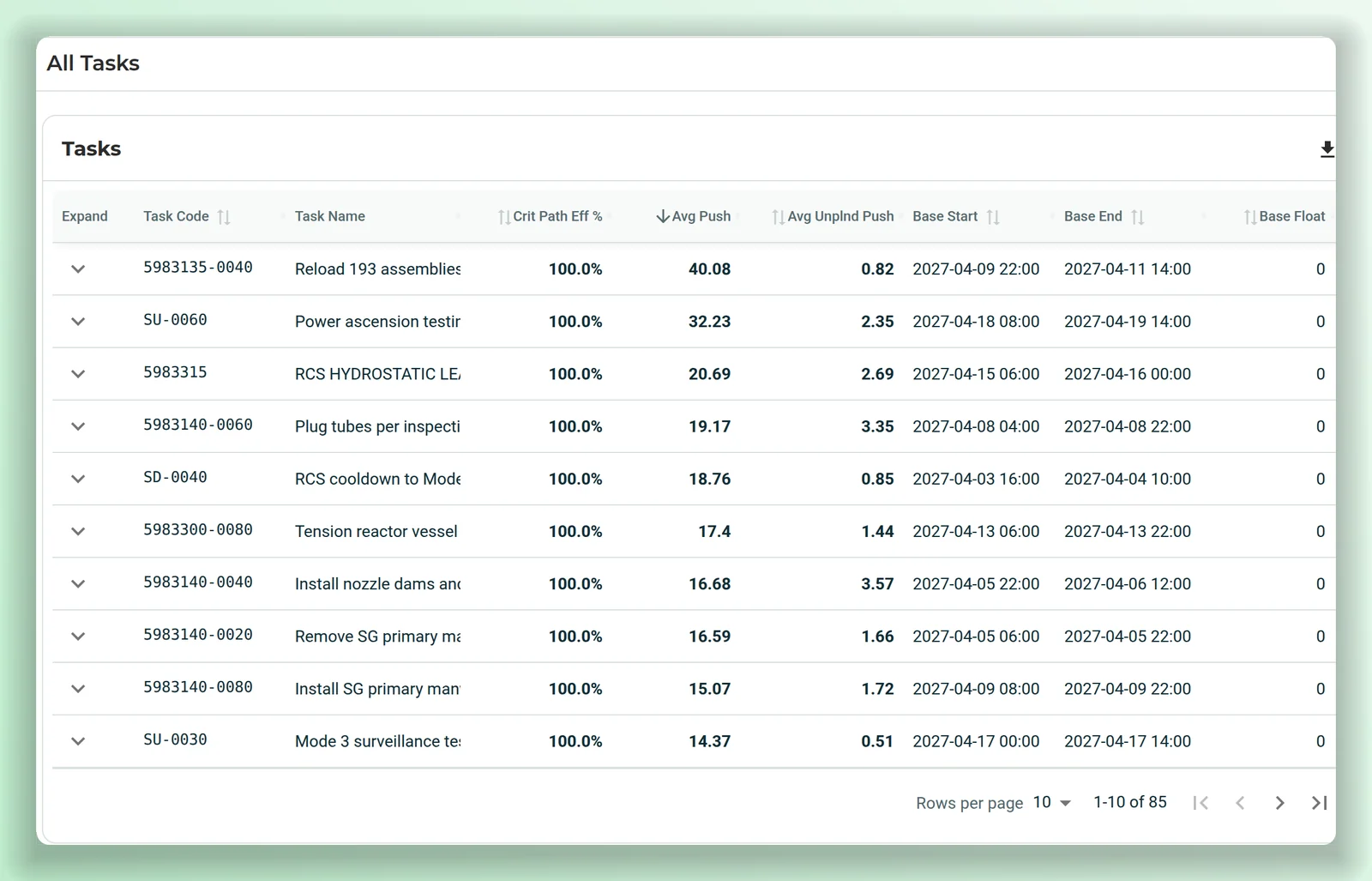
P6's critical path is one answer from one set of durations. Work AI reports what happened across all the runs, activity by activity.
- Open an activity to see its predecessors and successors.
- Save a sorted, filtered view as an insight, and download it as CSV.
Durations from how your work really went.
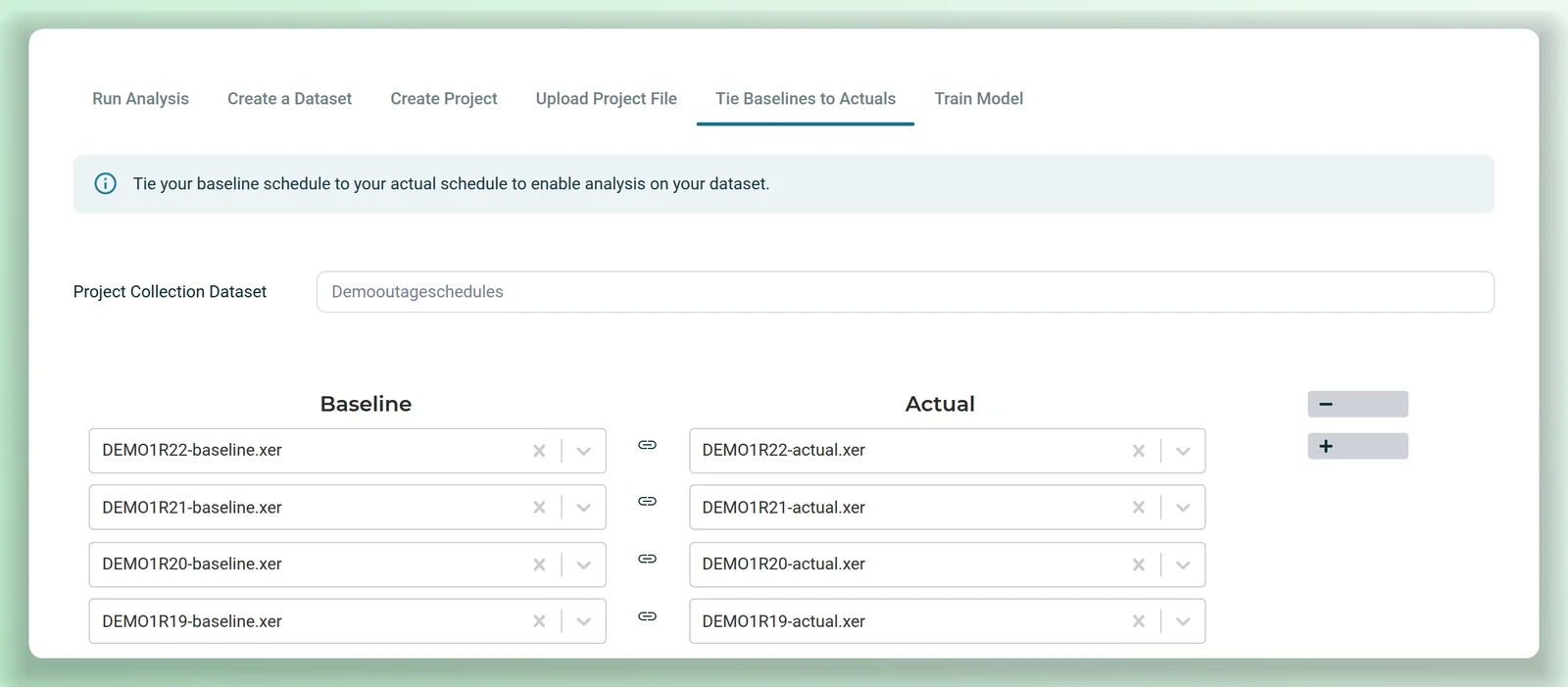
Pair each past outage's baseline schedule with its as-executed schedule. From the completed activities, Work AI learns how long work really took against its plan, by activity name, code, WBS, resource and planned duration, and uses that spread in each run.
- Train on the past outages you have, and train again after the next one.
- Training runs on the Nuclearn platform, on your schedules only.
- Outages and projects each keep their own goal date and key activity.
Find capital work booked as O&M.
Capitalizer tags work orders as capital or expense with a model trained on your own work-order history, so it follows the way your organization already classifies work. Run it over past work orders to find what was missed, and over new ones through an automation template.
A Nuclearn customer's first Capitalizer pass over about 10,000 of its work orders. A one-time result from past work, not a yearly figure.
Capitalizer suggests the cost treatment; your accountants decide it.
Your P6 files, your logic, your history
P6 .xer files
Upload exports straight from Primavera P6. Work AI reads the activities, logic and constraints from the file; it needs no connection to your P6 server.
Key activity
Measure against the milestone that matters, not just the last activity.
Start constraints
Keep start-on-or-after dates, drop them, or keep all but the key activity's.
Insights
Named, sorted and filtered views of the activity table, saved for later and downloadable as CSV.
Portfolio view
Outages and projects ranked by due-date risk and laid out by goal date, by month, quarter or year, each with its next milestone and when it was last analysed.
On the Nuclearn platform
Schedules live in datasets on the Nuclearn platform, with the same sign-in and roles as your other Nuclearn products. Separate privileges decide who can view, run and delete schedule analyses.
What it is not
Work AI isn't a scheduling tool and doesn't replace P6 or your schedulers. It reads exported schedules and doesn't change them; its finish dates are forecasts from your own history, and its optimization is a review queue, not a re-plan. Capitalizer suggests a cost treatment; your accountants decide.
Your schedules stay in your Nuclearn deployment.
Schedules, trained models and results live in your plant's datasets on the Nuclearn platform, and access goes through the platform's sign-in and roles.
Single-tenant, hosted by Nuclearn
Each plant gets its own instance, hosted by Nuclearn in our own datacenter on our own hardware. Azure Government or your own servers on request.
Built for 10 CFR Part 810
How Work AI is hosted, operated and supported is set up for 10 CFR Part 810 export controls.
Nuclearn platform sign-in
Single sign-on through your identity provider, or the platform's own accounts. Work AI keeps no separate user store.
Roles and permissions
Platform roles decide who can view, run and delete analyses, and dataset permissions decide who can see each schedule.
Read-only to P6
Work AI works from the files you upload. It has no connection to your P6 server and doesn't write to your schedule.
A certified company
Nuclearn is ISO/IEC 27001:2022 certified. Schedule risk and Capitalizer are each switched on per deployment.
Questions plants ask first
Does outage optimization change our schedule?
No. It gives your outage team a ranked list of the logic ties that set the finish, each with how far it moves your milestone. Your planners decide what to release, and approved changes go into P6 through your own change process. Today it's offered as a pilot on your own schedules, hosted by Nuclearn, and it can run in shadow mode alongside an outage.
Do we have to change how we schedule?
No. Your schedulers keep building and updating the outage in P6. Work AI reads the .xer files you export, and its results are views and CSV files beside the schedule, not changes to it.
What history does it need?
Pairs of schedules from past outages or projects: the baseline, and the as-executed schedule after the work was done. Work AI learns from the completed activities in those pairs. The more cycles you give it, the more of your work it has seen; we'll look at what you have in the demo.
Can we use it during an outage?
Yes. Upload the current export and run it again. Finished activities drop out, the work left is run again with durations from your history, and the odds against your goal date update.
Is it only for refuelling outages?
No. It works on any P6 schedule with logic that you can export as an .xer file, such as forced-outage schedules and capital projects. The portfolio view ranks them all together.
What does Capitalizer need?
Your work orders and how your organization has classified them, so the model learns your way of deciding. From there it can review past work orders for capital work that was missed and tag new ones through an automation template. Your accountants make the final call.
Where does it run, and who can sign in?
On the Nuclearn platform: each plant runs in its own single-tenant instance, hosted by Nuclearn in our own datacenter on our own hardware, with hosting, operations and support set up for 10 CFR Part 810 export controls. Azure Government or your own servers on request. People sign in through the platform, with single sign-on if you use it. Schedule risk and Capitalizer are each switched on per deployment.
See an outage schedule put to the test.
We'll run a synthetic refuelling outage, walk through the odds of its goal date and the activities that drive it, show how past outages train it, and explain how an optimization pilot on your own schedules works. Then we'll answer your IT team's questions about hosting and sign-in.
- A live walkthrough on a synthetic outage schedule
- Your questions on deployment, sign-in and data
- What your outage history would let it learn
Nuclearn Work AI is backed by Nuclearn, whose products serve over 70 facilities in North America and the U.K.
Book a demo
Tell us a little about your site and we'll set up a time.
Thanks, we've got it.
We'll be in touch to set up a time. If it's urgent, email contact@nuclearn.ai.
Prefer email? contact@nuclearn.ai